
7 months ago
Get your World Broadcast enabled

You have until December 1 at 10am PT to add your World ID to your Devpost submission (draft or submitted) so that meta can enable World Broadcast to it.
There are three $37,500 prizes associated with Implementation of World Broadcast.
How do I get access for competition?
- Find your World ID by opening the Desktop Editor and loading the relevant world. Look at the window title bar (at the very top of the application window). The title should read something like: “Horizon Worlds - [World Name] ([World ID])” for example: “Horizon Worlds - Asset Showcase (276649855216812)”
- Copy your numeric World ID.
- Click Start project or Edit project on the Devpost competition page here.
- Paste your World ID on the Project details tab within the About the project section on Devpost (see screenshot below).
- Click Save & continue so your World ID saves to your project on Devpost.
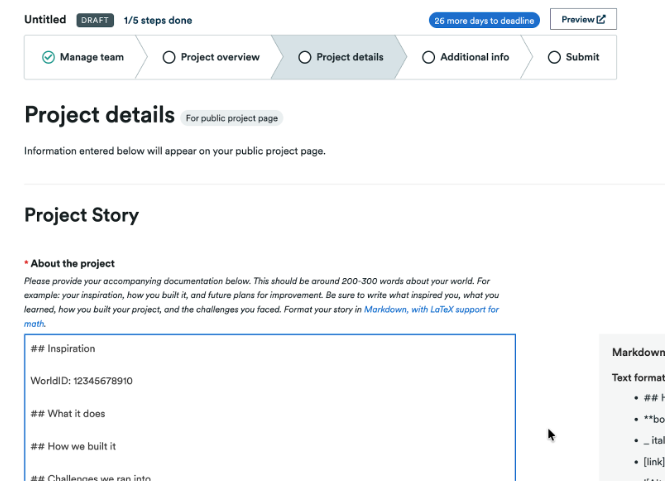
Do the above before December 1 at 10 am PT and you will receive access within a few business days of December 1st.
About World Broadcast
World Broadcast streams from live cameras inside Horizon. Potential players can see inside the world, which entices them to hit the Go button. Learn more about World Broadcast.
Looking for help? Join an Office Hour or Live educational session from the Creator Forum! Best of luck
Upcoming key events:
Tuesday, Nov 18: 🌐 World Persistent Variables: Unlock Possibilities
Thursday, Nov 20: 🎮 Behind the Build: Super Strike - The 4 Things Every Game Should Do
See past recorded sessions on Youtube
Not in the Meta Horizon Creator Program (MHCP) yet? If not a member, join here. We have created an expedited process to review your application so you can participate in the competition. Visit the MHCP FAQ here.
Best of luck!